Vorelix AI: Video Generator
- 2.2
- Rating
- 10.00K
- Installs
- Free
- Price

 Analysis by App-foxy
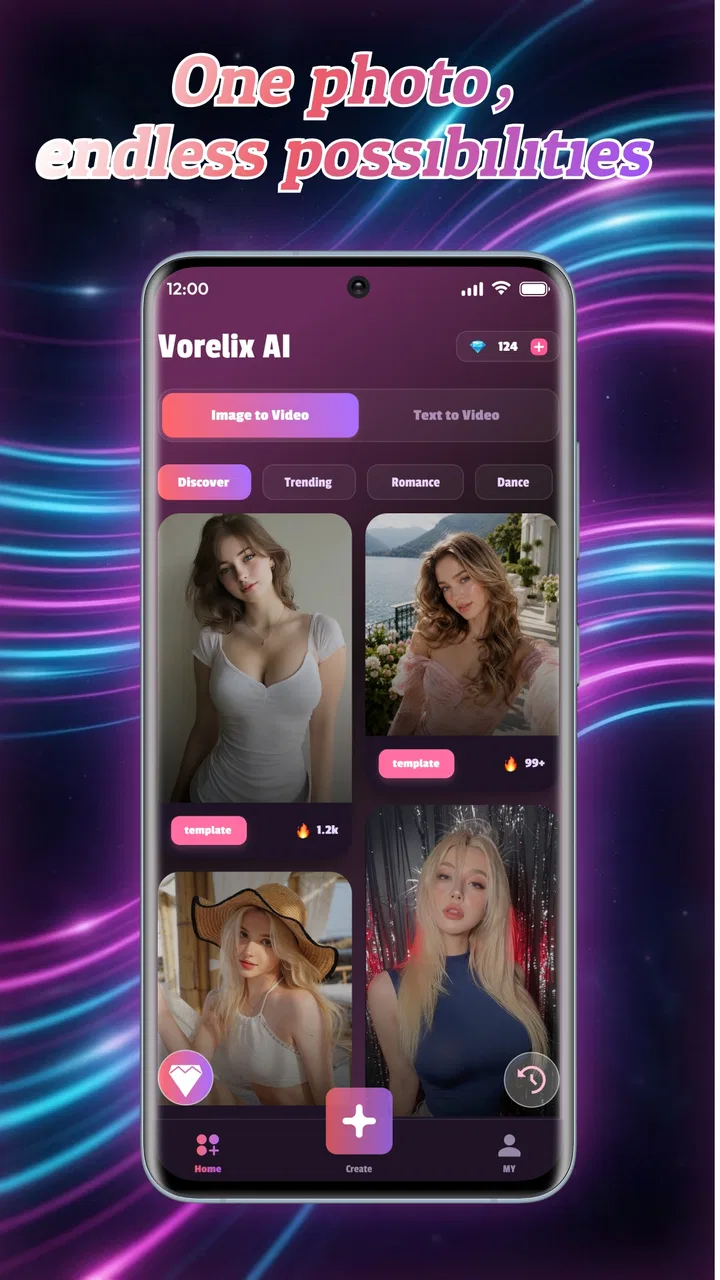
Vorelix AI is an ambitious video-making tool for people who want to turn ordinary photos, written ideas, and ready-made templates into something more lively without opening a full desktop editor. After spending time with it, my view is fairly clear: it is most useful as a quick creative starting point, not as a complete replacement for a serious video-production app. The appeal is immediate, especially when I want to make a short visual post from a handful of images, but the experience also asks for patience and realistic expectations.
That distinction matters because the app sits in a crowded tools category. Many mobile editors already handle trimming, captions, music, transitions, and social formats with more predictable control. Vorelix AI takes a different route by focusing on assisted creation from photos, text, and templates. I found that approach more interesting when I had a clear idea but not enough time or editing confidence to build every scene manually.
What the app is really good at
The strongest part of the experience is the gap between a static collection of images and a presentable short video. A photo album can feel flat when shared as-is, while an AI-assisted sequence gives the material a sense of movement and intention. I would use it for a birthday montage, a small product teaser, a travel recap, or a quick announcement where the goal is to communicate an idea rather than produce a polished commercial.
You May Also Like

 AccuWeather: Weather Radar
AccuWeather Review: A Quick, Clear Forecast for Everyday Decisions
For everyday plans, the best forecast is the one you can understand quickly. AccuWeather makes rain timing, radar, and local conditions easy to act on, with a few trade-offs.

 Hill Climb Racing
Why Hill Climb Racing Still Turns Crashes Into One More Run
A tiny car, a bumpy hill and one more upgrade: Hill Climb Racing keeps resurfacing because its simple chaos makes every near-miss feel personal.

 AliExpress - Shopping App
AliExpress Makes Global Shopping Feel Personal, but Shoppers Bear the Risk
AliExpress turns a global marketplace into a pocket-sized discovery engine. Its reach is useful, its shopping loop compelling, and its trade-offs easy to miss.

 Lords Mobile: Kingdom Wars
Lords Mobile Is a Kingdom-Building Routine, Not a Quick Match
A case-by-case verdict on the building, battles, device demands, and social commitments that make Lords Mobile rewarding for some players and exhausting for others.

 PDF Scanner app - TapScanner
TapScanner Makes Paperwork Easier to Capture, Check, and Share
TapScanner makes scanning with a phone feel less like a rescue operation and more like a dependable step in getting work done. Its capture tools are useful, though not flawless.

 Block Blast!
 Shows How Much a Puzzle Game Can Leave Out
A quiet grid game shows why puzzle players increasingly value instant clarity, repeatable skill and low-pressure play—and where the genre still needs to catch up.
More From Our News Desk
View All News


The text-driven side is also useful for overcoming the blank-page problem. Instead of beginning with an empty timeline, I can start with a sentence describing the mood or purpose of the clip. That makes the first draft feel less intimidating. The important word is “draft,” though. I would not treat the first generated result as finished work. I see it as a visual suggestion that helps me decide what direction to take.
Templates add another practical shortcut. They are particularly helpful when the content already has a simple structure, such as a sequence of portraits, a few event photos, or a small collection of images for a social update. Rather than spending time deciding how every image should enter and leave the frame, I can let the template establish the rhythm and then judge whether the result feels appropriate.
A useful workflow is to prepare the source material before opening the editor. I select only the images that support one idea, put the strongest image near the beginning, and avoid mixing unrelated pictures. This makes the generated result easier to evaluate. When I feed an app a random camera roll, the output can feel random too; when I provide a focused set, the same automation becomes much more convincing.
One of my favorite practical uses is creating a private first draft for an event. Imagine returning from a family gathering with several photos and wanting to show relatives a short recap that evening. I can use the images, describe the atmosphere in plain language, and see whether the app creates a coherent sequence. Even if I later adjust the result elsewhere, I have saved the time normally spent deciding on an opening, a middle, and an ending.
It can also help a small seller who needs a quick visual concept before investing in a more formal production. A few product photos and a clear description may be enough to explore whether a vertical clip, a mood-focused presentation, or a simple showcase feels right. I would still check every frame carefully before publishing, but the app can make experimentation cheaper in terms of time and effort.
Why the assisted approach feels different
Traditional mobile editors reward control. I choose each cut, transition, title, and duration. Vorelix AI is more about direction: I provide material and intent, then review what the system proposes. That is a meaningful difference in mindset. People who enjoy fine-tuning every moment may find the process less satisfying, while people who struggle to begin may appreciate having a rough structure appear quickly.
The app’s value therefore depends on the kind of decision I am trying to make. If I already know exactly where every image should appear, a conventional timeline editor may be faster. If I have a vague concept and want to see several possible interpretations, AI assistance becomes more useful. I would choose Vorelix AI during the exploration stage and a conventional editor during the precision stage.
Another non-obvious benefit is that it encourages me to think in terms of a message instead of a pile of assets. When I write a short prompt, I have to decide what the video is actually about. Is it a warm memory, a clean product introduction, or a dramatic announcement? That small act of defining the purpose often improves the result more than adding another photo would.
For that reason, I recommend writing prompts that describe audience, mood, subject, and intended use rather than vague requests. “Make a video from these photos” gives little creative guidance. A better approach is to explain that the images show a relaxed weekend, that the tone should feel warm and personal, and that the result is meant to be shared as a short recap. I would keep the wording simple and revise one idea at a time.
Where the experience becomes less dependable
The main weakness is that automation can make creative choices I do not fully agree with. A generated sequence may technically include the right images while still giving too much attention to a weak photo, moving through the story too quickly, or creating a mood that does not match the original memory. AI can arrange material, but it does not understand the personal importance of every frame in the way I do.
This is especially noticeable with photos that have different orientations, lighting, or subjects. A portrait image and a wide landscape may need different framing decisions. If the app handles them in a way that feels awkward, I may spend more time correcting the result than I would have spent arranging a short sequence manually. That does not make the tool useless, but it limits how much I want to rely on one-click creation.
Text-based generation also needs a careful review. A visual idea can sound excellent in a sentence but become too generic once translated into moving images. I would check whether the generated video actually reflects the important detail in the prompt, rather than assuming that a polished-looking result is automatically relevant. For personal projects, this is mostly an artistic concern. For promotional content, it becomes a credibility issue.
There is also a practical cost consideration. The app is free to install, but in-app purchases range from $2.99 to $209.99 per item. That broad range means I would explore the basic experience cautiously before committing money. Anyone who expects frequent generation should examine the purchase prompts and decide whether the likely value matches their own usage. A person making one occasional family montage has a very different calculation from someone producing content every week.
The relatively modest public reception should also encourage a measured approach. Vorelix AI has an average rating of 2.2 from around thirteen ratings and five written reviews. That is not enough for me to dismiss the app on its own, but it is a reminder that the experience may not feel equally smooth for everyone. I would test it with nonessential material first, learn the workflow, and only then use it for an important project.
Another limitation is that AI-generated editing can obscure the reason behind a choice. In a manual editor, I know exactly why a transition appears or why a photo lasts a particular length. With an automated result, I may need to inspect the sequence and make my own judgment without much explanation. That is fine for casual creativity, but less comfortable when consistency and repeatability matter.
Who should try it, and who should choose something else
I think the best audience is made up of casual creators, families, students, small sellers, and social-media users who have visual material but do not want to learn a complicated editing timeline. It is also a reasonable option for someone who wants to turn a written concept into a quick visual experiment. The app’s Everyone age rating makes it broadly approachable, and its minimum operating-system requirement is Android 8.0 or later.
I would especially recommend it to people who often postpone making videos because they do not know how to start. The combination of photos, text, and templates gives them several entry points. They can begin with existing images, describe the result they want, or use a prepared design as a framework. That flexibility is more valuable than advanced control for a beginner who mainly needs momentum.
On the other hand, I would steer professional editors, filmmakers, and users who need exact timing toward a more established timeline-based tool. The same applies to anyone producing client work where every visual decision must be repeatable. Vorelix AI may help generate an early concept, but I would not make it the only tool in a workflow that depends on detailed revisions, precise brand consistency, or dependable control over every scene.
It is also not the best choice for someone who wants a straightforward slideshow editor with no creative interpretation. If the goal is simply to place photos in a chosen order, add a familiar soundtrack, and control each duration directly, a conventional editor may feel clearer. Vorelix AI earns its place when the user wants assistance with the creative arrangement, not merely a digital version of a photo album.
Details worth knowing before committing
The app is developed by MOSSCOVE (PRIVATE) LIMITED and currently carries version 1.1.0. I would treat that version information as a reason to keep expectations practical: the product is something I would explore and evaluate through actual use, rather than assume it has the maturity of a long-established editing suite. The install count is over 10K, which suggests that people are trying it, but it is still a relatively small audience compared with the biggest mobile video tools.
Because the app combines personal photos with AI-assisted creation, I would begin with copies of images rather than relying on the only version stored on my phone. I would also review the generated video from beginning to end before sharing it. This is good practice for any automated creative tool, but it is especially important here because a result can look attractive at a glance while still placing the wrong image, emphasis, or wording in a key moment.
For a smoother session, I would prepare three things: a small group of related photos, one sentence explaining the intended story, and a decision about where the final video will be used. That preparation reduces trial and error. If the first result misses the point, I would change the prompt or remove a distracting image instead of changing everything at once. This makes it easier to understand whether the problem came from the instructions or the source material.
I would also separate experimentation from publishing. The app is well suited to generating alternatives: a gentle version for family, a more energetic version for a social post, or a cleaner version for a product idea. Once I find a direction I like, I can decide whether the result is good enough as it stands or whether it needs refinement in another editor. That two-stage workflow is, in my opinion, a better use of the app than expecting it to handle every part of production.
My final view
Vorelix AI: Video Generator has a clear and worthwhile idea: make video creation less intimidating by turning photos, written direction, and templates into a starting point. In my experience, that makes it appealing for quick personal projects and early creative experiments. Its strongest quality is not perfect automation; it is the ability to help me move from “I should make something” to “I have a draft I can react to.”
The trade-off is control. Results need review, source images need selection, and the purchase range deserves attention before regular use. The low average rating, based on a small number of ratings, also tells me to approach it as an app to test rather than an automatic recommendation for everyone. I would not choose it for precision editing or demanding professional delivery.
My recommendation is simple: try it if you want an assisted first draft, not if you want a fully predictable editing workstation. For a casual creator with a focused set of photos and a clear idea, it can be a convenient creative companion. For anyone who values exact timing and complete manual control, a traditional mobile editor will probably remain the better fit.
FAQs for Vorelix AI: Video Generator
01What is Vorelix AI: Video Generator used for?
Vorelix AI: Video Generator is designed to help users create short videos from text prompts, images, or other creative instructions. It may be useful for social media posts, promotional clips, story concepts, visual experiments, and personal projects. The app is aimed at users who want AI-assisted video creation without needing advanced editing or animation skills.
02Is Vorelix AI: Video Generator free to download and use?
The application may be available to download at no initial cost, but some tools, generation options, export features, or higher-quality results can require in-app purchases or a subscription. Before creating multiple videos, check the current pricing, trial conditions, credit system, and renewal terms shown on the app store or inside the application, since these details can change.
03Does Vorelix AI: Video Generator require an internet connection?
Yes, users should generally expect to need a stable internet connection. AI video generation is commonly processed on remote servers rather than entirely on the phone, so prompts and uploaded media may be sent for processing. Offline access may be limited to viewing saved projects or exported files, while creating new videos usually requires mobile data or Wi-Fi.
04Can beginners create videos with Vorelix AI: Video Generator?
The app is intended to make AI-assisted video creation accessible to beginners, with a workflow based on prompts, templates, or uploaded images instead of complex editing timelines. However, the quality of the result depends on how clearly the request is written. New users may need to experiment with wording, styles, duration, and revisions before getting a video that matches their expectations.
05Are there privacy or copyright concerns when using Vorelix AI: Video Generator?
Before uploading personal photos, business materials, or copyrighted media, review the app’s privacy policy and terms of service. Avoid submitting content that you do not own or have permission to use, and remember that AI-generated results may still resemble protected styles, brands, people, or characters. Also check whether generated videos include watermarks or have commercial-use restrictions.
Pros
- Creates videos from text prompts with minimal editing experience.
- Useful for quickly producing social media clips and marketing concepts.
- AI-generated visuals can help turn rough ideas into creative drafts.
- Supports faster experimentation with different video concepts.
- Cloud-based workflow reduces the need for powerful local hardware.
Cons
- Results may vary significantly depending on how clearly prompts are written.
- AI visuals can include odd movements
- artifacts
- or inconsistent details.
- Longer or more complex videos may require additional processing time.
- Advanced customization may be limited compared with professional editors.
- Some features or export options may require a paid subscription.

Vorelix AI: Video Generator
Gallery